Ten Best Software Solutions for Landscape Design
Have you recently acquired a home with a piece of land? Looking to revamp your outdoor space? While designing your yard is exciting, it also can feel overwhelming at times. The possibilities are endless, from creating beautiful flower beds and seating areas to planning pathways and play areas. With the right tools, transforming your vision into reality is quick and easy. This is where landscape design software comes in.
Landscape design software allows you to visualize, plan, and experiment with different garden layouts and ideas before committing to physical changes. It saves time, money, and effort — for both beginners and experienced gardeners. This type of software helps with everything from selecting plants to placing structures, ensuring your garden is functional and beautiful.
In this guide, we’ll explore the 10 best software solutions for landscape design that cater to various needs, experience levels, and preferences. From beginner-friendly tools that make design easy and fun to more professional programs offering advanced features, we’ve got something for every gardener. If you’re looking for the best software to create a personalized landscape, keep reading!
1. SketchUp: A Powerful Tool for 3D Design and Modeling
SketchUp is one of the most widely recognized names in the world of 3D modeling. While it’s not specifically designed for landscape or garden design, its powerful features make it an excellent choice for anyone looking to create detailed, realistic outdoors layouts. SketchUp allows users to build models from scratch or use pre-existing templates, which makes it highly versatile.
Although SketchUp has a bit of a learning curve for beginners, its intuitive interface and vast library of 3D models make it a go-to for those with more advanced design skills. Many professionals in the architecture, landscape, and interior design fields use SketchUp, but it’s also accessible enough for amateur garden designers to give it a try.
- 3D Modeling: SketchUp allows you to design in full 3D, making it easier to visualize how your garden will look in real life.
- 3D Warehouse: SketchUp's extensive 3D warehouse contains thousands of pre-made models (including plants, furniture, structures, etc.) that you can easily incorporate into your designs.
- Realistic Rendering: With integrated plugins like V-Ray, you can render highly realistic images of your garden layout.
- Flexible Platform: It runs on both Windows and Mac computers, and there’s even a free online version for users who want to try out the software before purchasing.
Pros- Highly Detailed Models: SketchUp excels at creating realistic, detailed models, making it a great tool for designing complex garden layouts.
- Introduction for beginners: While it's best suited for intermediate to advanced users, the free version (SketchUp Free) includes a tutorial to help beginners get started.
- Large Library of Objects: The vast library of 3D models, textures, and materials makes it easy to bring your vision to life.
- Collaboration: Its sharing and collaboration features make it perfect for teams working on large landscape projects.
Cons- Learning Curve: While the interface is user-friendly, mastering SketchUp can take time, especially for beginners who are not familiar with 3D design.
- Not Specifically for Landscaping: SketchUp is a general-purpose tool, so you may need additional plugins or resources to fully adapt it to garden design.
- Paid Versions Can Be Expensive: Although the free version is great, accessing more advanced features requires a paid subscription, which can get rather pricey for hobbyists.
2. GardenBox 3D: A Specialized Tool for Garden Design Enthusiasts
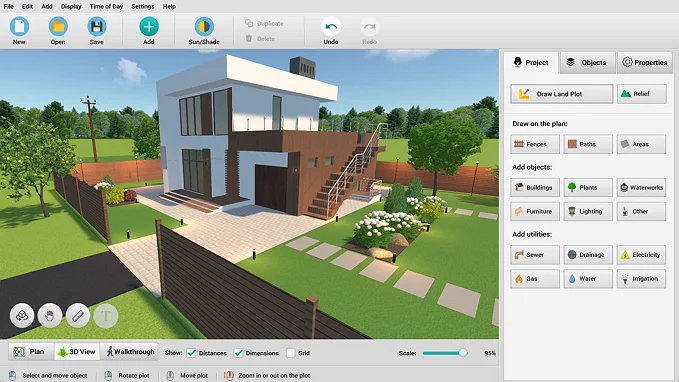
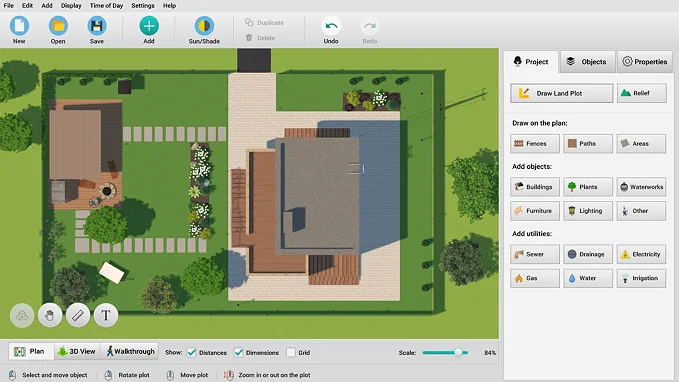
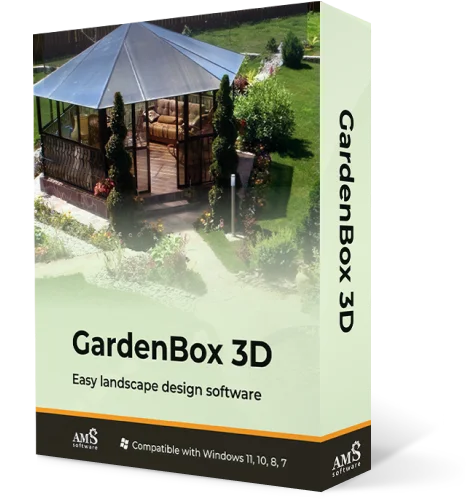
GardenBox 3D is a dedicated landscape design software tailored specifically to gardeners and outdoor enthusiasts. Unlike most plot planning tools, GardenBox 3D focuses entirely on garden planning, making it a great choice for those who want a more hands-on, intuitive approach to creating outdoor spaces. Looking to plan small flower beds or large outdoor landscapes? GardenBox 3D provides a user-friendly interface to design your space, whatever it looks like.
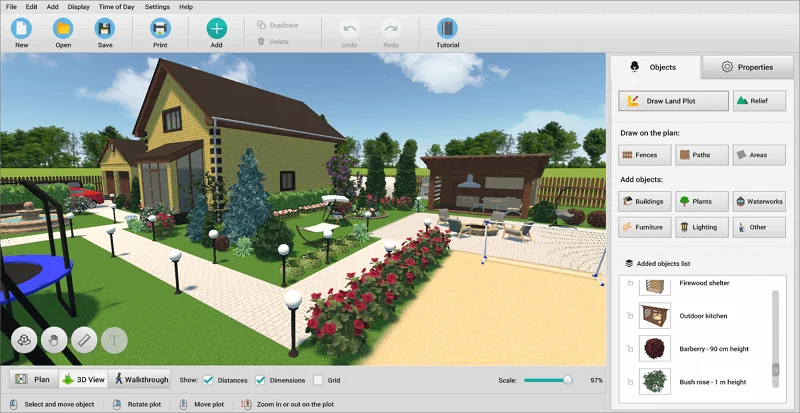
The software allows you to create detailed 3D layouts, offering a clear representation of how plants, structures, and other features will look in your real-world outdoor space. GardenBox 3D comes with a plant collection, enabling users to select plants appropriate for their specific climate and soil conditions. It's a perfect solution for property owners who want to visualize all elements of their landscape in one place and experiment with various combinations before making decisions.
- Easy-to-Use Interface: With its drag-and-drop functionality, GardenBox 3D is designed to be simple for beginners while still providing advanced tools for experienced users.
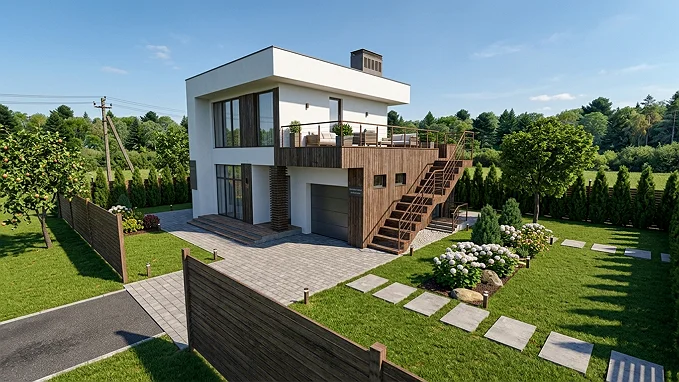
- 3D Visualization: GardenBox 3D allows users to view their garden designs in full 3D, giving a realistic perspective of how the finished garden will look.
- Flexible Plot Creation: The software enables users to create plots of any shape, including the ability to draw slopes and hills, providing flexibility in designing unique landscapes.
- Landscape and Hardscape Design Tools: Not only can you plan flower beds and plant arrangements, but you can also design paths, patios, water features, and other hardscaping elements.
- Customizable Materials and Colors: GardenBox 3D makes it easy to change the colors and materials of specific elements, such as the roof or walls of a gazebo, allowing for detailed customization.
Pros- Beginner-Friendly: GardenBox 3D is one of the easiest garden design tools available, making it ideal for beginners who may be intimidated by more complex software.
- Comprehensive Plant Collection: The plant library helps users choose the right plants for their garden, considering local climate and soil types.
- Focused on Landscaping: Unlike general 3D modeling software, GardenBox 3D is tailored to landscape design, meaning it includes relevant tools and features.
- Time-of-Day Planning: The ability to visualize how your garden will look at different times of the day is a standout feature, particularly for users looking to plan how lighting and shadows will affect their space throughout the day.
Cons- Mac Version Not Available: Currently, GardenBox 3D is only available for Windows users, making it less accessible for those using macOS.
- Paid Software: Though it’s affordable compared to some other design tools, GardenBox 3D still requires a one-time payment, which may not appeal to those looking for free options.
For Windows 11, 10, 8, 7
3. Lands Design: Comprehensive Tool for Landscape Architects
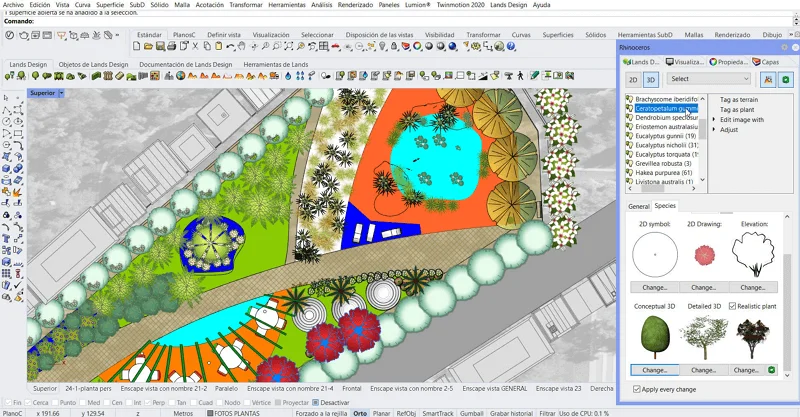
Lands Design is an advanced landscape design software that’s well-suited for professionals and hobbyists alike. It’s intended for landscape architects and gardeners who want to create detailed, real-life layouts with a focus on both aesthetics and functionality. With the ability to create 2D and 3D designs, Lands Design is an ideal solution for those who need a comprehensive tool for all aspects of garden planning, including planting, irrigation, and terrain modeling.
The software integrates with AutoCAD, functioning as a plugin. Lands Design is highly versatile, allowing users to create both small-scale gardens and large outdoor environments, complete with advanced features like irrigation design and terrain analysis.
- 2D and 3D Visualization: Lands Design supports both 2D and 3D models, offering users flexibility in how they approach their landscaping projects.
- Planting Design: The software includes an extensive plant library that provides detailed information about different species, helping users select the most appropriate plants for their project.
- Irrigation and Terrain Analysis: A standout feature of Lands Design is its ability to create irrigation systems and conduct terrain analysis to assess drainage and water flow. This makes it ideal for users looking to design sustainable gardens.
- Realistic Rendering: The program can generate high-quality renders, providing an impressive visual representation of the final design. All these visuals can then be used to present ideas to clients, stakeholders, or potential investors.
- Integration with AutoCAD: Lands Design works as an extension for AutoCAD, making it easier for landscape architects to use advanced tools in their designs. However, this feature also poses a challenge for beginners, as they must first install AutoCAD — a complex, resource-heavy program that is far from being intuitive.
Pros- Professional-Grade Features: Lands Design is packed with features that make it suitable for professional landscape architects, such as irrigation planning and terrain modeling.
- Highly Detailed and Customizable: The ability to create detailed 3D models and customize designs to suit your needs is a major strength.
- Extensive Plant Catalog: With access to an extensive plant catalog, you can easily select species that will thrive in your garden’s climate and soil.
Cons- Not for Beginners: The software’s complexity and professional-grade features may be overwhelming for beginner users or those with little experience in design software.
- Dependency on Other Platforms: Lands Design requires either AutoCAD or Rhinoceros to be installed beforehand; it cannot function independently.
- Expensive: Lands Design is not a free tool, and its pricing may be prohibitive for hobbyists or gardeners on a budget.
- Steep Learning Curve: Due to its wide range of features and technical capabilities, Lands Design requires time to learn and master, which may be challenging for those new to landscape design software.
4. PRO Landscape: A Solution for Professionals and Hobbyists
PRO Landscape is an established software program designed for landscape professionals, contractors, and homeowners. It’s known for its ability to combine ease of use with powerful, professional-grade features. PRO Landscape allows users to create both 2D and 3D layouts, and its flexibility makes it suitable for a variety of projects, from small residential gardens to larger commercial landscape designs.
What makes PRO Landscape stand out is its ability to provide an all-in-one solution that covers everything from conceptual design to final presentations. The software includes tools for designing layouts, adding plants, creating irrigation plans, and generating realistic visualizations. Its user-friendly interface makes it a solid choice for those just starting in landscape design, but its advanced features ensure that specialists can still create professional-level arrangements.
- 2D and 3D Design: PRO Landscape offers both 2D and 3D design modes, so users can create basic layouts and detailed 3D renderings of their landscapes.
- Plant Library: The software includes a large collection of plants, along with detailed plant information, helping you select the right species based on climate, soil, and sunlight requirements.
- Irrigation and Lighting Design: PRO Landscape provides tools for designing irrigation systems and outdoor lighting, which are essential components of any well-planned garden.
- Realistic Visualization: With advanced rendering capabilities, PRO Landscape allows you to create realistic visuals of your design, which is useful for both personal use and client presentations.
- Mobile App: PRO Landscape also offers a mobile app, allowing users to work on their designs on the go, making it convenient for landscape designers working in the field or homeowners wanting to tweak their garden plans.
Pros- User-Friendly: Despite its professional-grade capabilities, PRO Landscape is accessible enough for beginners and homeowners who may not have extensive design experience.
- Comprehensive Features: PRO Landscape covers a wide range of aspects, from plant selection and layout design to irrigation and lighting, making it a one-stop-shop for landscape planning.
- Mobile Compatibility: The mobile app makes it easy to design your landscape plans while on the go, whether you're at home or out in the garden.
Cons- Rather Expensive: While PRO Landscape offers a lot of functionality, its pricing is somewhat higher than some of the other options on the market, particularly for casual users.
- Steeper Learning Curve: Although the software is user-friendly for beginners, mastering the more advanced features takes time, especially for those who are not familiar with landscape planners.
- Windows Only: PRO Landscape runs only on Windows, which can be a limitation for Mac users.
GardenBox 3D
One of the handiest
landscape design programs
meeting all your needs
For Windows 11, 10, 8, 7
5. Gartenplaner: A Simple and Free Online Tool for Garden Design
Gartenplaner is a free, web-based garden design tool that allows users to easily plan and visualize their outdoor spaces. Designed with simplicity in mind, it’s ideal for beginners or homeowners who want a quick, no-fuss way to create garden layouts without the need for advanced features or a steep learning curve. This software is accessible directly through your web browser, meaning you don’t need to download anything to start using it.
Gartenplaner offers a user-friendly interface that lets you drag and drop such elements as plants, flowers, trees, paths, etc. into your design. You can then adjust the layout, resize elements, and get a good idea of how your space will look when complete. Although it lacks some of the more advanced features seen in other design tools, it’s perfect for those looking for a straightforward way to plan their garden on a budget.
The software is currently only available in German and French, so users who are not familiar with these languages might face some challenges. However, its intuitive design compensates for the language barrier, making it relatively easy to understand and use, even for those who don’t speak the supported languages.
- Free to Use: Gartenplaner is a completely free tool, making it accessible to everyone who wants to plan their garden without investing in expensive software.
- Drag-and-Drop Interface: The tool's intuitive drag-and-drop interface makes it easy to add garden elements such as plants, trees, and pathways, and arrange them in your desired layout.
- Basic 2D Layouts: Gartenplaner provides 2D design functionality, allowing users to create simple layouts without getting into complex 3D modeling or detailed rendering.
- Online Access: Since it’s a web-based tool, you can access your design from any computer or device with an internet connection, providing great flexibility.
Pros- Free: One of the biggest advantages of Gartenplaner is that it’s entirely free, providing great value for users who want basic garden design tools without any financial investment.
- Easy to Use: The simple interface and drag-and-drop functionality make it ideal for beginners or anyone who doesn’t have much experience with design software.
- Access Anytime, Anywhere: As an online tool, you can access Gartenplaner from any device with an internet connection, whether at home or on the go.
- Customizable: Adjustable predefined elements help you get started quickly and have your design ready in minutes.
Cons- No Detailed Rendering: Unlike some other landscape planners, Gartenplaner lacks high-quality visualization options — you won’t be able to see photorealistic images of your garden design.
- Limited to German and French: Gartenplaner is currently only available in German and French, which could be a barrier for non-speakers.
- Basic 2D Designs: The tool is focused on simplicity, so it only supports 2D garden layouts. Users looking for advanced 3D designs will find this tool limiting.
- Limited Plant and Feature Library: While Gartenplaner offers a selection of plants, trees, and other garden elements, the range of its collection is not as extensive as that of some other programs.
6. iScape: A Simple Yet Effective Mobile App for Garden Design
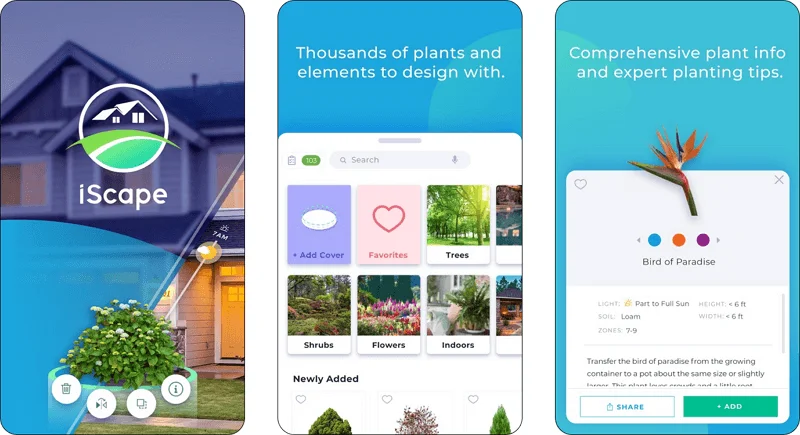
iScape is a landscape planning app available for iOS devices, making it an excellent choice for users who prefer designing on the go. It’s built to be simple and intuitive, offering a straightforward way for homeowners and garden enthusiasts to create and visualize garden layouts without the complexity of desktop software. iScape allows users to design outdoor spaces by dragging and dropping various elements like plants, trees, hardscaping materials, and structures, giving them an easy way to experiment with different looks.
The app is especially useful for those who are new to landscape planning or want a quick way to visualize changes in their garden without learning complex software. iScape also allows users to take photos of their existing garden and overlay their designs, making it easier to visualize how their plans will look in the real world.
- Intuitive Interface: iScape is built with ease of use in mind, making it ideal for beginners or anyone who wants to quickly design their garden without a steep learning curve.
- Drag-and-Drop Functionality: The app lets you drag and drop landscape elements like trees, shrubs, and garden furniture onto your design canvas, making it easy to experiment with different layouts.
- Realistic Visualization: iScape uses augmented reality (AR) to help you visualize how your designs will look in your actual space. By simply using your phone’s camera, you can see your plan overlaid on your garden, bringing your vision to life in real time.
- Customizable Plant Options: iScape offers a selection of plants and materials, and allows users to import their own photos to create more customized designs.
- Photo Integration: Users can take photos of their existing garden and overlay their design ideas, making it easier to understand how changes will fit into the real-world environment.
Pros- Easy to Use: iScape’s user-friendly design and simple drag-and-drop functionality make it perfect for beginners who don’t want to deal with complicated software.
- Portable: As a mobile app, iScape allows you to design anywhere, whether at home or in your garden, making it convenient for on-the-go planning.
- Augmented Reality (AR): The AR feature makes it easy to see how design elements will look in your landscape, helping you make decisions with more confidence.
- Affordable: iScape offers a more affordable solution compared to many desktop software tools, making it accessible for budget-conscious users.
Cons- Subscription-Based: Although the app is free to download, many features are locked behind a subscription, which may deter users seeking a fully free solution.
- Limited Advanced Features: While iScape is great for basic landscape design, it lacks some of the advanced features found in desktop software, such as complex 3D modeling or detailed irrigation planning.
- iOS Only: iScape is currently only available on iOS devices, which limits its accessibility for Android users.
7. Realtime Landscaping: Advanced Design with a Focus on Realism
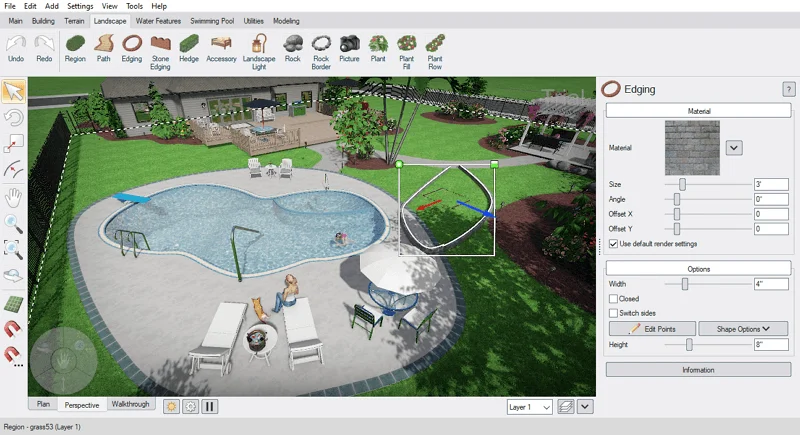
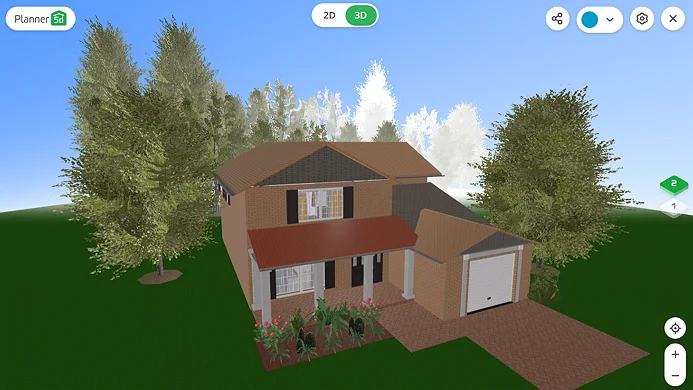
Realtime Landscaping is a comprehensive landscape planner that combines ease of use with advanced features, making it suitable for both hobbyists and professionals. This software is popular for its ability to generate realistic 3D renderings, which allows users to see exactly how their garden or outdoor space will look before they start working on it.
With Realtime Landscaping, you can create 2D site plans, add 3D elements like plants, hardscapes, and structures, and even simulate lighting and weather conditions. This software also supports a variety of import and export formats, which is useful for professionals who need to share their designs with clients or colleagues. Whether you’re planning a small garden or a large commercial landscape, Realtime Landscaping provides the tools to create a visually appealing layout.
- 2D and 3D Design: Realtime Landscaping allows users to work in both 2D and 3D modes, making it easy to switch between layouts and realistic visualizations.
- Extensive Library of Plants and Materials: The software includes a vast library of plants, trees, and hardscaping materials, allowing users to customize their designs and select the most appropriate options for their garden.
- Interactive Features: The software allows users to interact with their designs, adjusting elements like lighting, shadows, and plant growth over time to better simulate real-world conditions.
- Virtual Tours: Users can take virtual tours of their 3D designs, which can be especially helpful for large projects or when presenting them to clients.
Pros- Perfect for Large-Scale Projects: Whether you’re developing a small garden or a commercial landscape, Realtime Landscaping offers tools that scale well for projects of all sizes.
- True to Life: Photo-realistic renderings with lighting and shadow simulations set Realtime Landscaping apart from other design software.
- User-Friendly Interface: Despite its advanced features, Realtime Landscaping offers an intuitive interface that makes it easy for beginners to get started.
Cons- Windows Only: Like many other professional-grade landscape design tools, Realtime Landscaping is available only on Windows-based computers, which could be a downside for Mac users.
- Price: Realtime Landscaping is a premium software, and its price may be prohibitive for hobbyists or users with a tight budget.
- Challenges with Advanced Features: Although the basics are easy to grasp, fully mastering the advanced features, such as rendering and virtual tours, may require more time and effort.
8. Garden Planner: Simple, Intuitive Design for DIY Gardeners
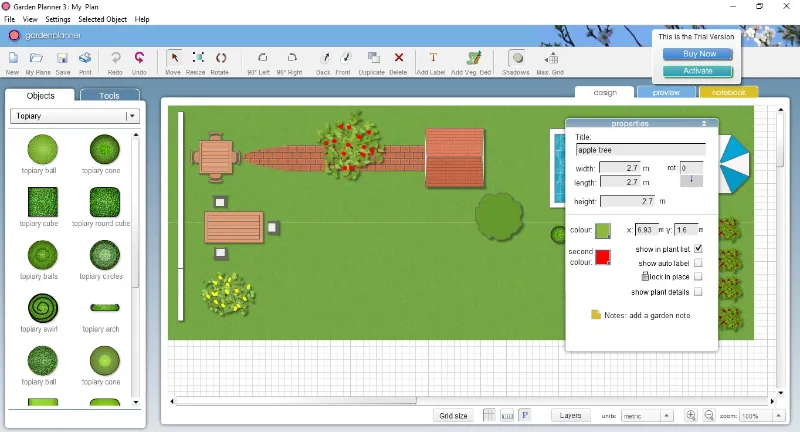
Garden Planner is a helpful desktop application that offers a simple, drag-and-drop interface for planning your garden. Intended for beginners and DIY gardeners, this software helps you visualize your garden layout without requiring any advanced design skills. With a focus on ease of use, Garden Planner allows users to quickly arrange plants, structures, and other garden elements on a grid-based interface. While it may not offer the depth of more advanced landscape design software, its simplicity makes it perfect for anyone looking for a no-fuss solution.
The software comes with a library of pre-drawn objects, including plants, pathways, and fencing. Garden Planner is available for both Windows and Mac users, making it accessible to a wide audience of design enthusiasts.
- Drag-and-Drop Interface: The intuitive drag-and-drop system helps users effortlessly add plants, paths, and other garden features to their design.
- Grid-Based Layout: The grid-based system makes it easy to create accurate, proportional designs, helping users visualize how different elements will fit together in their real garden.
- Plant Selection: Garden Planner includes a library of plants, making it simple to choose species that will work well in your garden. You can also create custom plants for added flexibility.
- Customizable Garden Elements: The software allows you to customize garden furniture, fences, and other elements, enabling you to create a garden design that reflects your personal style.
- Seasonal Planning: Garden Planner offers a feature to simulate how plants will grow over time, allowing you to visualize changes in your garden across different seasons.
Pros- Highly User-Friendly: Garden Planner is one of the easiest garden design tools available, which makes it ideal for beginners. You can start landscaping immediately, without spending much time learning how to use the software.
- Affordable: Compared to many other landscape design software tools, Garden Planner is an inexpensive and accessible option for budget-conscious users.
- Cross-Platform Compatibility: Garden Planner works on both Windows and Mac computers, reaching a wider audience.
Cons- Limited Features: Garden Planner is best suited for smaller-scale projects and basic designs. It lacks advanced features like 3D rendering, terrain modeling, or irrigation planning that more professional software offers.
- No Mobile Version: Garden Planner is only available as a computer program, meaning you can’t work on your designs when you're on the go.
- Basic Plant Library: The plant catalog is not as extensive as those found in more advanced programs for Windows or Mac, which may deter users looking to design highly customized gardens.
9. SmartDraw: A Versatile Tool for Garden and Landscape Design
SmartDraw is an easy-to-use diagramming and design software that’s suitable for a variety of applications, including landscape planning. While it's more commonly known for its flowcharts and business diagrams, SmartDraw also offers robust tools for creating 2D layouts and designing outdoor spaces. It’s ideal for users who want to create quick and professional-looking layouts without a steep learning curve.
What sets SmartDraw apart from other landscape design tools is its simplicity and integration with other platforms. It comes with pre-made templates and symbols, making it easy to get started. Users can create detailed garden layouts, incorporate 2D and 3D elements, and customize their designs to suit their specific needs. Whether you’re planning a backyard garden, a commercial landscape, or a detailed outdoor project, SmartDraw provides the tools necessary to create a polished design.
- Intuitive Design Interface: SmartDraw’s user-friendly interface makes it simple to create garden layouts and landscape designs, even for those with no prior experience.
- Pre-Made Templates: The software includes a wide variety of pre-designed templates and symbols for gardens, trees, fences, plants, and more, helping you quickly visualize your ideas.
- 2D and 3D Capabilities: While SmartDraw primarily focuses on 2D designs, it also allows users to create 3D models of their landscapes.
- Cloud and Collaboration Features: SmartDraw offers cloud-based features, allowing anyone to use their setups from anywhere and collaborate with others in real-time. This is especially helpful for professional landscape designers working with clients or teams.
- Integration with Other Software: SmartDraw integrates well with other platforms such as Microsoft Office and Google Drive, allowing you to easily import and export your designs on your computer.
Pros- Reasonably priced: Compared to professional-grade landscape design software, SmartDraw is relatively inexpensive, making it an accessible option for casual gardeners or those on a budget.
- Ease of Use: SmartDraw is an excellent choice for beginners who need a simple tool for creating garden layouts without the complexity of more advanced software.
- Wide Range of Templates: The extensive library of templates and symbols makes it easy to create well-laid designs quickly.
Cons- Limited Advanced Features: While SmartDraw is powerful for basic designs, it doesn’t have the depth of features found in more specialized computer tools, such as terrain modeling or detailed 3D rendering.
- Basic Plant Library: The plant database is not as extensive as those in some other programs, which might be a limitation for users looking for specific species or highly detailed plant information.
- Learning Curve for 3D: While it offers 3D capabilities, SmartDraw’s 3D modeling tools are not as advanced or intuitive as those in programs specifically intended for 3D landscape planning, which may limit its use for more complex projects.
10. Lumion: A Powerhouse in Landscape Visualization
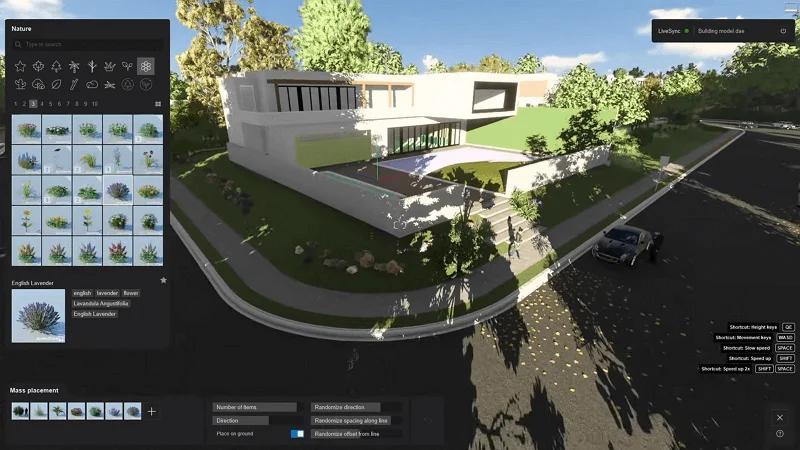
Lumion is a professional 3D rendering software that’s particularly popular among architects and landscape specialists. What sets Lumion apart from other computer tools for creatives is its focus on creating high-quality, photorealistic designs. While it’s typically used for architectural rendering, Lumion’s powerful features make it a great choice for landscape professionals looking to bring their projects to life with realistic detail.
With Lumion, you can easily create 3D models of gardens, landscapes, and outdoor spaces, then apply realistic textures, lighting, and environmental effects to produce lifelike renderings. The software also offers a library of pre-made 3D models, including trees, plants, terrain elements, and outdoor furniture, which helps streamline the design process. Lumion is built for both professionals and beginners who want to create immersive, high-quality visualizations, making it ideal for those who need to present their designs in an aesthetically pleasing way.
- Photorealistic Rendering: Lumion excels at generating lifelike renderings of outdoor spaces, allowing users to create realistic visuals that capture the atmosphere and mood of their landscape designs.
- Large Library of 3D Models: The software includes an extensive library of pre-made 3D models of plants, trees, terrain elements, and more, making it easy to populate your design with realistic objects.
- Weather and Environmental Effects: One of Lumion’s standout features is its ability to simulate different weather conditions and environmental effects, such as rain, sunlight, fog, and shadows. This allows users to create dynamic and realistic visualizations that showcase how the design will look under different conditions.
- Animation and Video Tools: Lumion also supports animation and video creation, allowing users to generate walkthroughs of their designs and create compelling presentations that bring their landscape layouts to life.
Pros- Video and Animation Support: Lumion’s animation and video tools are ideal for creating engaging computer presentations and virtual tours of your designs, making it a valuable tool for both landscape designers and architects.
- Real-Time Feedback: The real-time rendering feature makes it easy to see changes as you make them, which speeds up the design process.
- User-Friendly Interface: Despite its advanced capabilities, Lumion is relatively easy to use, with an intuitive interface that allows designers to quickly learn how to create stunning visualizations.
Cons- Expensive: Lumion is a premium software, and its pricing may be out of reach for casual users or those on a tight budget. While it offers top-tier rendering capabilities, it’s priced more for professional users and businesses.
- Steep System Requirements: Lumion requires a powerful computer to run efficiently, especially when working with large or complex design projects.
- Not a Full Design Software: While Lumion is good for visualization, it’s not a complete landscape design tool. Users will need to pair it with other software to handle the initial design and planning stages.
Conclusion: Choosing the Best Software for Your Landscape Design Needs
When it comes to designing your garden or landscape, the right software can make all the difference. Whether you’re a beginner looking to experiment with your outdoor space or a professional needing advanced tools to create detailed, accurate plans, there are numerous software options available to suit your needs.
Tools like SmartDraw and GardenBox 3D are perfect for users looking for ease of use, while programs like SketchUp provide precision and advanced features for professional designers and those seeking more detailed landscape designs. For those in need of high-end visualizations, Lumion stands out with its ability to produce realistic renderings that can impress clients or help you make design decisions with greater confidence.
Ultimately, the best software for your landscape design projects depends on factors such as the complexity of the project, your level of expertise, and the specific features you need. No matter what software you choose, the key to a successful garden or landscape design lies in how effectively you translate your ideas into action. With the right computer tools, you can turn your outdoor space into a beautiful, functional haven that reflects your unique style.